Make a cheap mic sound expensive.

VioletVox is one vocal plugin for home studios. It tunes your voice, finds the mud and harshness for you, and smooths the whole take, so you can stop stacking ten plugins and get back to the song.

VST3 and AU. Mac and Windows. Works in Ableton, FL Studio, Logic and Reason.

Four panels, in the order your voice goes through them.

Turn the big glass knob in each panel and you're most of the way there. Everything else is there when you want to dig in.

  1. TunePitch correction, harmonies and doubles
  2. CleanMud, boom, harshness and breaths
  3. Control76-style compression, tone, reference match
  4. ColorWarmth, effects, reverb and delay
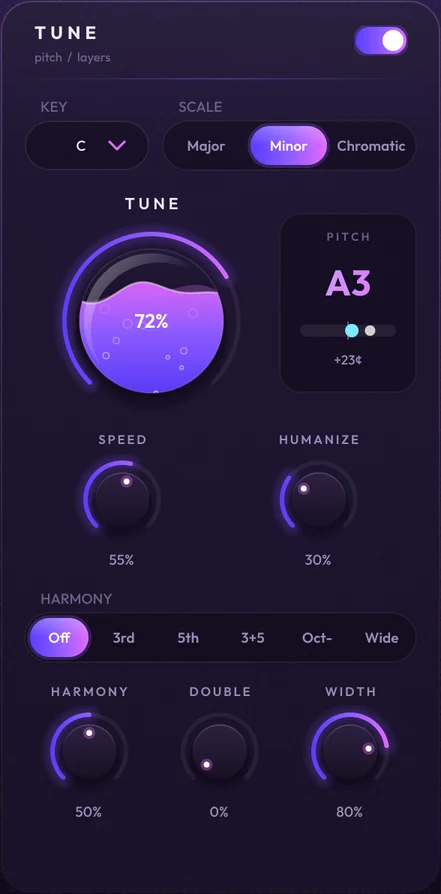
The Tune panel: key, scale, tune amount, live pitch display, speed, humanize and harmony controls

1. Tune

Natural correction or the hard trap snap, in real time.

Pick your key and scale and turn Tune up. The pitch display shows the note you're singing and how far off it is, live.

  • Speed goes from invisible correction to robotic snap.
  • Humanize keeps your vibrato on long notes.
  • Harmony adds a 3rd, 5th, both, or an octave below, in key.
  • Double thickens one take into a wide stack.
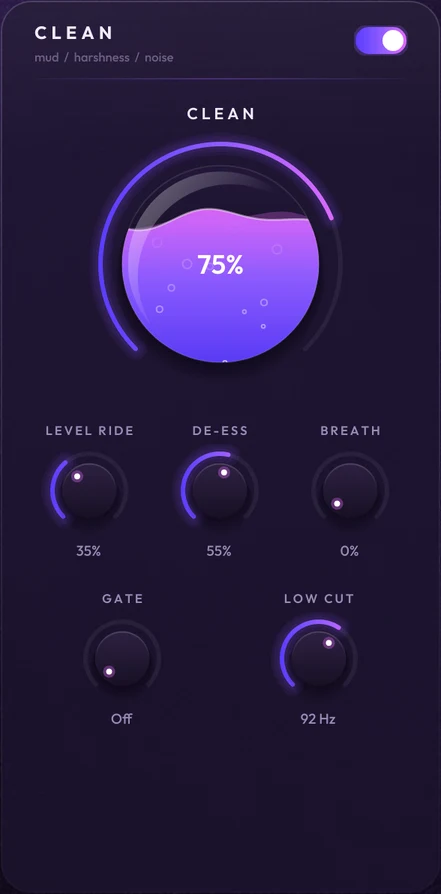
The Clean panel with the liquid Clean knob, level ride, de-esser, breath, gate and low cut

2. Clean

One knob that hears what a bedroom does to your voice.

Clean listens for the exact frequency that rings in your room or your mic (boom, mud, boxiness, harshness) and cuts only that, only while it rings. A vocal that's already clean is left alone.

  • Level Ride rides the fader for you, so quiet words come up.
  • De-Ess catches S's by their tone, not their volume.
  • Breath turns breaths down between lines.
  • Gate drops room noise without chopping word endings.
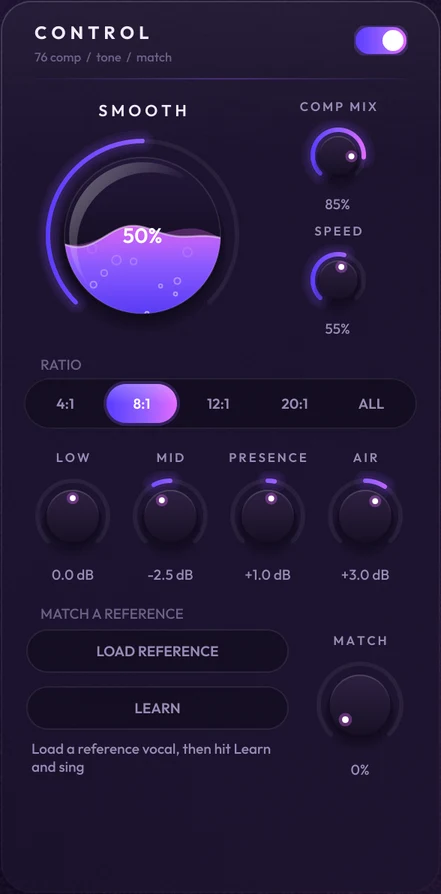
The Control panel with the Smooth compressor knob, ratio buttons, four-band tone EQ and reference matching

3. Control

The fast, gritty compression your favourite records use.

Smooth drives a 76-style compressor, with ratios from 4:1 to all-buttons-in. Blend it in parallel so the vocal stays alive.

  • Tone has Low, Mid, Presence and Air, with movable frequencies on the Advanced page.
  • Match a reference: load an acapella you love, sing for 8 seconds, and VioletVox EQs your voice toward it.
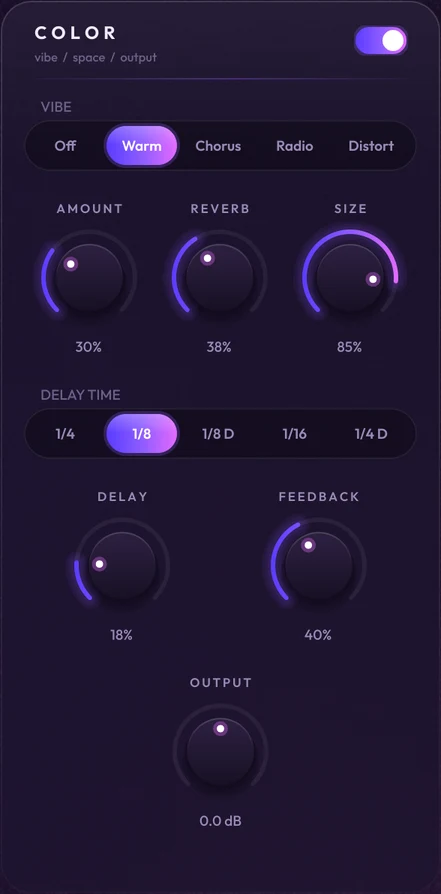
The Color panel with vibe choices, reverb, delay and output

4. Color

Space and character, already sitting in the mix.

A dark, filtered plate reverb that doesn't wash the vocal out, and a tempo-synced delay that ducks while you sing and blooms in the gaps.

  • Vibe adds warm tape, chorus, radio or distortion.
  • Advanced has pre-delay, damping, width, millisecond delay times and ducking.

Hear the switch.

The same vocal, recorded at home. Press play, then flip VioletVox on and off while it plays.

Fits the setup you already have.

  • Ableton Live
  • FL Studio
  • Logic Pro
  • Reason
  • Cubase
  • Studio One
  • Bitwig
Formats
VST3 (Mac and Windows), AU (Mac)
Mac
macOS 10.13 or newer, Apple Silicon and Intel
Windows
Windows 10 or 11, 64-bit
Latency
Zero, or about 15 ms with Tune on (your DAW compensates automatically)
Presets
55 factory presets, plus save your own
Pro Tools
Not supported (no AAX)

55 presets to start from.

Pick the sound closest to your record, then turn the big knobs.

Start hereBedroom Rescue, Cheap Mic Fix
R&B smoothAfter Hours Glow, Silk Sheets
Dark popNeon Haze, Midnight Mirror
Pop shineRadio Gloss, Big Chorus Lead
RapHard Bars, Toronto Late Night
Melodic trapMoon Bounce, Astro Wash
Backing vocalsDouble Tight, Choir Stack
FX and colorOld Radio, Tape Memory
Yazed signatureIllusion, Desire, Transformation

Own it. No subscription.

€29€49

Launch price. Pay once, keep it forever.

Buy VioletVox

Secure checkout by Gumroad. The Mac and Windows installers and your license key arrive by email straight away.

  • VioletVox for Mac and Windows, VST3 and AU
  • Auto-tune, harmony and doubler
  • Automatic Clean, de-esser, breath control and gate
  • 76-style compressor, tone EQ and reference matching
  • Warm, chorus, radio and distortion, plus reverb and delay
  • 55 presets, and save your own
  • Use it on up to 3 of your computers
  • Free updates for every 1.x version

Questions

How do I install and activate it?

After checkout, Gumroad gives you the Mac and Windows installers and your license key. Run the installer and rescan plugins in your DAW. Your license key is on your Gumroad receipt. Open VioletVox, click Activate in the top-right corner, paste the key and click Activate. It needs the internet once to check the key, then works offline.

My Mac says the installer can't be opened.

Right-click the installer and choose Open, then confirm. If macOS still blocks it, go to System Settings, then Privacy & Security, and click Open Anyway. After installing, rescan plugins in your DAW.

Is the auto-tune like Melodyne?

No. VioletVox tunes in real time while you play or record, like classic auto-tune. Melodyne lets you edit single notes by hand afterwards. Most home-studio vocals only need the real-time kind.

Does it work in Pro Tools?

Not yet. VioletVox is VST3 and AU, so it runs in Ableton, FL Studio, Logic, Reason, Cubase, Studio One, Bitwig and most other DAWs, but not Pro Tools.

Can I use it on more than one computer?

Yes, one license works on up to 3 of your own computers, for example your studio Mac and your laptop.

What if it doesn't work on my system?

Check the system requirements above before you buy. If VioletVox won't run on your computer, email us within 14 days and we'll sort it out or refund you.